---
title: Contacts
sidebarTitle: Contacts
description: Learn how to add, search, edit, unsubscribe, and delete Reloop contacts from the dashboard or API.
icon: contacts
faq:
- question: Is each email its own contact?
answer: Yes. A Reloop contact is one person record keyed by a unique email address in your organization. Subscription status, custom properties, groups, and channel preferences all live on that same record.
- question: What happens if I add a duplicate email?
answer: Email is unique per organization. Creating a contact with an email that already exists returns an error — update the existing contact instead of creating another one.
- question: What is the difference between unsubscribed and blocked?
answer: Unsubscribed means the contact opted out of your list. Blocked usually comes from deliverability issues such as a hard bounce or spam complaint, with a suppression reason on the contact.
- question: Can I export my contacts?
answer: Yes. From the contacts list in the dashboard, use Export CSV to download email, status, and created-at for the current view.
- question: How do I manage contacts with code?
answer: Use the Reloop SDK or REST API to create, list, get, update, and delete contacts. The same operations are available in the dashboard under Contacts.
- question: Does Reloop sync contacts with external CRMs (Salesforce, HubSpot, etc.)?
answer: Reloop does not include a built-in two-way CRM sync. Sync contacts yourself with the Contacts API and webhooks, or connect tools like Zapier and n8n to move data between Reloop and your CRM.
- question: Are there webhooks for contact events (created, updated, unsubscribed, deleted)?
answer: Yes. Subscribe to contact.create, contact.update, contact.delete, contact.subscribed, contact.unsubscribed, and contact.blocked. Configure endpoints in the dashboard or Webhooks API.
- question: Is there a rate limit on the Contacts API?
answer: Yes. Contacts endpoints are rate-limited per organization (for example, create 200/min, list and get 60/min, update and delete 30/min). Exceeding a limit returns 429 with Retry-After. See Usage Limits in the API docs.
- question: Is there a cap on total contacts per plan or organization?
answer: Reloop does not enforce a fixed total-contact cap per plan. Storage is unbounded by a hard contact quota; API rate limits still apply when you create or update contacts in bulk.
---
> For the complete documentation index, see [llms-docs.txt](/llms-docs.txt) or the site index [llms.txt](/llms.txt). Full docs corpus: [llms-full-docs.txt](/llms-full-docs.txt). Prefer markdown URLs (append `.md`) for agent consumption. Product skill: [skill.md](/skill.md).
## View all contacts
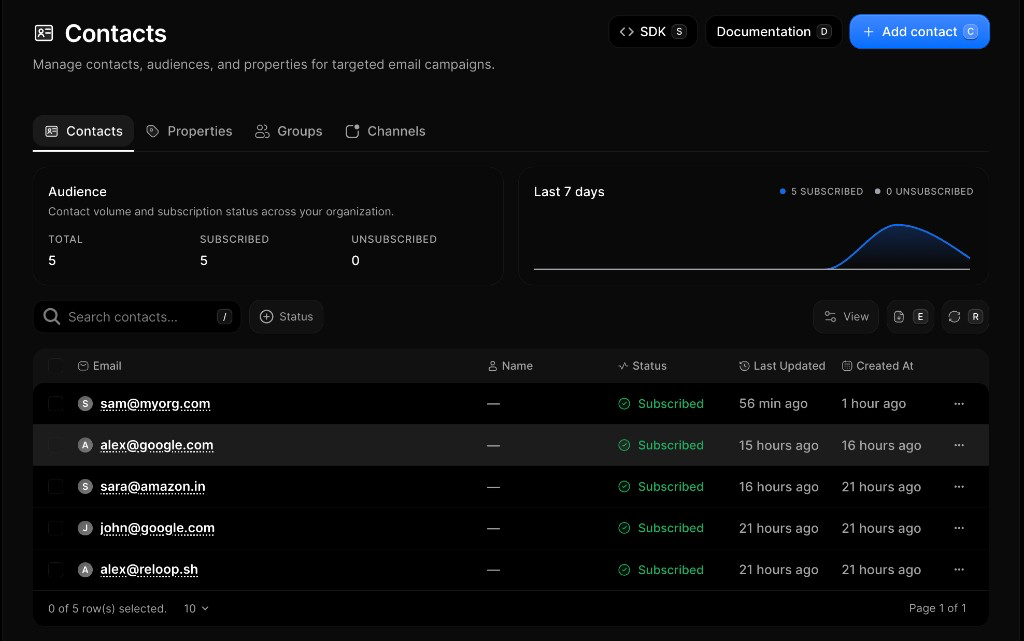
The [Contacts Dashboard](https://reloop.sh/dashboard/contacts) shows you all the contacts in your organization along with their status, audience totals, and recent activity.
## Add a contact
1. Go to [Contacts](https://reloop.sh/dashboard/contacts)
2. Click **Add contact** (or press `C`)
3. Choose **Import CSV file**, **Copy paste**, or **Sync via SDK**
4. Finish that flow — map CSV columns, paste emails, or follow the SDK snippets
5. Confirm to add the contacts
Email is unique per organization. If the address already exists, Reloop returns an error — update that contact instead of creating another one.
## Search and filter contacts
1. Open [Contacts](https://reloop.sh/dashboard/contacts)
2. Use **Search contacts…** (or press `/`) to find by email
3. Optionally filter by **Status** (Subscribed, Unsubscribed, or Blocked)
4. Click a row to open detail — or use **Export CSV** (`E`) for an offline copy
## Edit a contact
You can update a contact’s name or [properties](/docs/learn/contacts/properties). Subscription status is changed separately with [Subscribe or unsubscribe](#subscribe-or-unsubscribe-a-contact).
1. Go to [Contacts](https://reloop.sh/dashboard/contacts)
2. Click the row menu (**···**) next to the contact you want to edit
3. Select **Edit**
4. Update the fields and click **Update** (or press `Enter`)
## Subscribe or unsubscribe a contact
Unsubscribing opts the contact out of your list without deleting them. Status can be `subscribed`, `unsubscribed`, or `blocked` (often from deliverability).
1. Open [Contacts](https://reloop.sh/dashboard/contacts)
2. Click the row menu (**···**) → **Subscribe** or **Unsubscribe**
3. The contact status updates on the row
## Delete a contact
Deleting permanently removes the contact record. Recreate the contact if you need them again.
1. Open [Contacts](https://reloop.sh/dashboard/contacts)
2. Click the row menu (**···**) → **Delete**
3. Confirm permanent removal
## View all contacts
Fetch a paginated list of contacts in your organization.
## Add a contact
Create a contact with email and optional name, status, properties, groups, or channels.
Email is unique per organization. A duplicate email returns an error — update the existing contact instead.
## Edit a contact
## Subscribe or unsubscribe a contact
## Delete a contact
## FAQ
Yes. A Reloop contact is one person record keyed by a unique email address in your organization. Subscription status, custom properties, groups, and channel preferences all live on that same record.
Email is unique per organization. Creating a contact with an email that already exists returns an error — [update](#edit-a-contact) the existing contact instead of creating another one.
**Unsubscribed** means the contact opted out of your list. **Blocked** usually comes from deliverability issues such as a hard bounce or spam complaint, with a suppression reason on the contact.
Yes. From the contacts list in the dashboard, use **Export CSV** to download email, status, and created-at for the current view.
Use the Reloop SDK or REST API to create, list, get, update, and delete contacts — same operations as the dashboard.
No built-in two-way CRM sync. Use the Contacts API and [webhooks](/docs/webhooks) to sync yourself, or connect [Zapier](/docs/integrations/zapier) / [n8n](/docs/integrations/n8n) between Reloop and your CRM.
Yes — `contact.create`, `contact.update`, `contact.delete`, `contact.subscribed`, `contact.unsubscribed`, and `contact.blocked`. See [Contact webhooks](/docs/webhooks/contacts/created) and [event types](/docs/webhooks/event-types).
Yes. Limits are per organization (e.g. create **200**/min, list/get **60**/min, update/delete **30**/min). Over the limit → `429` with `Retry-After`. Full table: [Usage Limits](/docs/api/usage-limits).
No fixed total-contact cap per plan. You can store as many contacts as you need; bulk create/update is still gated by [API rate limits](/docs/api/usage-limits).
## Related
Custom string and number fields.
Lists for targeted sends.
Per-topic subscription preferences.
## API reference
Add a new contact.
Paginated list of organization contacts.
Get a contact by ID.
Change name, status, or properties.
Permanently delete a contact.