---
title: Contact Properties
sidebarTitle: Properties
description: Learn how to create, edit, and delete Reloop contact properties, and set values on contacts from the dashboard or API.
icon: tag
faq:
- question: What are contact properties in Reloop?
answer: Properties are small details you add to a contact — custom String or Number fields with an optional default. Use them for personalization and targeting (for example company or plan_tier).
- question: What property types does Reloop support?
answer: Reloop contact properties support String (free-form text) and Number (integer or decimal), plus an optional fallback default when a contact has no value.
- question: What happens when I delete a contact property?
answer: Deleting a property removes the schema definition. Existing contacts keep raw key-value data, but the field is no longer managed globally.
- question: How do I name a contact property?
answer: Use letters, numbers, and underscores only. Names must start with a letter or underscore. Spaces are converted to underscores. When setting values on a contact, names must be lowercase (a-z, 0-9, underscores).
- question: Can I rename a property without losing data?
answer: No. After you create a property, you can only change its default (fallback) value. Name and type are fixed. To use a different name, create a new property and set values on contacts under that name.
- question: Can two properties have the same name but different casing (for example Company vs company)?
answer: No. Property names are unique per organization by exact name. When setting values on a contact, names must be lowercase (a-z, 0-9, underscores) — treat casing variants as unsupported.
- question: Can a property have different values for different contacts?
answer: Yes. The Properties page defines the shared field (schema). Each contact stores its own value. The optional default is only used when a contact has no value set.
- question: Can I set a property via CSV import?
answer: No. Reloop does not offer CSV import for custom property values today. Set values when you edit a contact in the dashboard or via the Contacts update API. Export CSV from the contacts list includes email, status, and created-at only.
- question: Is there a limit to how many properties I can create?
answer: Reloop does not enforce a fixed maximum number of properties per organization. Creating properties is rate-limited (30 create requests per 60 seconds per organization). See Usage Limits in the API docs.
---
> For the complete documentation index, see [llms-docs.txt](/llms-docs.txt) or the site index [llms.txt](/llms.txt). Full docs corpus: [llms-full-docs.txt](/llms-full-docs.txt). Prefer markdown URLs (append `.md`) for agent consumption. Product skill: [skill.md](/skill.md).
## View all contact properties
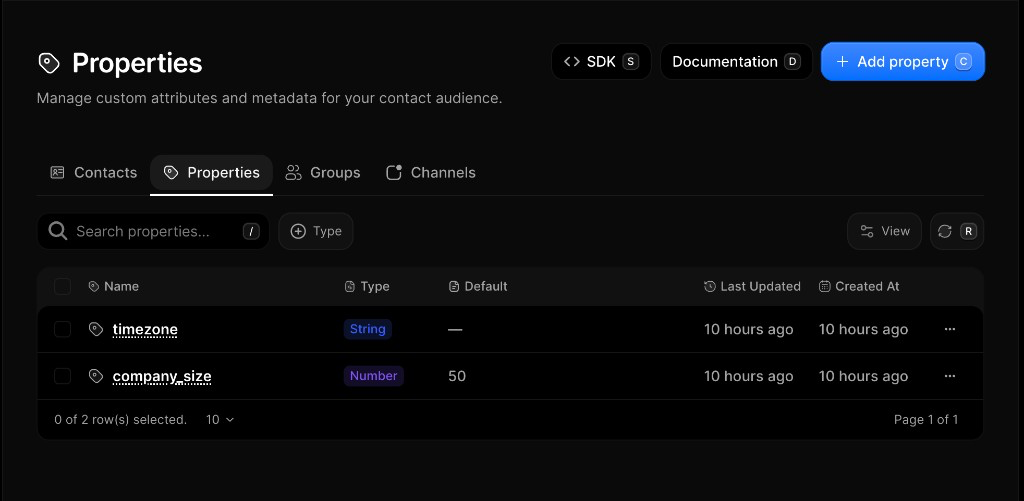
The [Properties Dashboard](https://reloop.sh/dashboard/contacts/properties) shows every custom field in your organization — name, type, default, and when it was last updated.
Properties are custom **String** or **Number** fields you attach to a [contact](/docs/learn/contacts). Use them for personalization and targeting (for example `company` or `plan_tier`). An optional default is used when a contact has no value set.
## Create a property
1. Go to [Contacts → Properties](https://reloop.sh/dashboard/contacts/properties)
2. Click **Add property** (or press `C`)
3. Enter a name (e.g. `plan_tier` or `company_size`) — letters, numbers, and underscores only
4. Choose type **String** or **Number**, and optionally set a default
5. Click **Add property** (or press `Enter`)
## Edit a property
After create, only the **default (fallback)** value can be changed. Name and type are fixed. To use a different name, create a new property and set values on contacts under that name.
1. Go to [Contacts → Properties](https://reloop.sh/dashboard/contacts/properties)
2. Click the row menu (**···**) next to the property you want to edit
3. Select **Edit**
4. Update the default value and click **Save** (or press `Enter`)
## Set values on a contact
The Properties page defines the **schema**. Values live on each contact — set them when you edit a contact in the dashboard or via the Contacts update API.
1. Open [Contacts](https://reloop.sh/dashboard/contacts)
2. Click the row menu (**···**) → **Edit** (or open the contact)
3. Fill the custom property fields (e.g. `plan_tier`, `timezone`, `company_size`)
4. Click **Update** (or press `Enter`)
## Delete a property
Deleting removes the schema definition. Existing contacts keep raw key-value data, but the field is no longer managed globally.
1. Open [Contacts → Properties](https://reloop.sh/dashboard/contacts/properties)
2. Click the row menu (**···**) → **Delete**
3. Confirm permanent removal
## View all contact properties
Fetch a paginated list of property definitions in your organization.
## Create a property
Create a new String or Number property schema for your contacts.
## Edit a property
## Set values on a contact
Set custom property values when you update a contact.
## Delete a property
## FAQ
Properties are small details you add to a contact — custom **String** or **Number** fields with an optional default. Use them for personalization and targeting (for example `company` or `plan_tier`).
**String** (free-form text) and **Number** (integer or decimal), plus an optional fallback when a contact has no value.
Deleting removes the schema definition. Existing contacts keep raw key-value data, but the field is no longer managed globally.
Use letters, numbers, and underscores only. Names must start with a letter or underscore. Spaces become underscores. When setting values on a contact, names must be lowercase (`a-z`, `0-9`, underscores).
No. After you create a property, you can only change its **default (fallback)** value — name and type stay fixed. To use a different name, create a new property and set values on contacts under that name.
No. Names are unique per organization by exact name. When setting values on a contact, names must be lowercase (`a-z`, `0-9`, underscores) — don’t rely on casing variants as separate fields.
Yes. The Properties page defines the shared field (schema). Each contact stores its own value. The optional default is only a fallback when a contact has no value set.
No. There is no CSV import for custom property values today. Set values when you [edit a contact](/docs/learn/contacts) in the dashboard or via the Contacts update API. **Export CSV** from the contacts list includes email, status, and created-at only.
Reloop does not enforce a fixed maximum per organization. Create is rate-limited (**30** requests per **60** seconds per organization). See [Usage Limits](/docs/api/usage-limits).
## Related
Add, search, and manage people in your organization.
Segment contacts for targeted sends.
Subscription topics and channel preferences.
## API reference
New property schema.
All properties.
Change default value.
Remove schema.